---
title: 02.08.26 - Custom map settings for finds, notes and layers - pinlog.app
url: "https://pinlog.app/en/other/changelog/map-settings"
date: 2026-10-10
modified: 2026-10-10
---
# 02.08.26 - Custom map settings for finds, notes and layers - pinlog.app

[Skip to main content](#page-content)[](https://pinlog.app/en/ "Pinlog")[DEEN](https://pinlog.app/sonstiges/changelog/karteneinstellungen "Deutsch")

Install as app
Faster access like an app
- iOS
- Android
- Desktop
×
Install Pinlog as a Progressive Web App (PWA) directly via your browser – no app store needed.
Install app

Install Pinlog as app
As a PWA directly via your browser
- iOS
- Android
- Desktop
Install app ×
The map just the way you like it: new map settings
--------------------------------------------------
Until now, you could only see your finds, notes and layers on the map in one fixed look that was the same for everyone? Not any more. **A new gear icon directly on the map lets you decide yourself how your markers are displayed.**
For finds, notes and layers you can choose their own **sizes, shapes and borders** – and decide whether a category icon is shown inside the marker. For finds you can also choose what the colour is based on, for example age, time of find or conductivity. A new legend shows you right away what each colour means.
You can also set how strongly markers close to each other are grouped into clusters. **All changes are saved automatically and apply across all your devices** – one click on “Reset map settings” brings back the default view at any time.
[ Show larger version 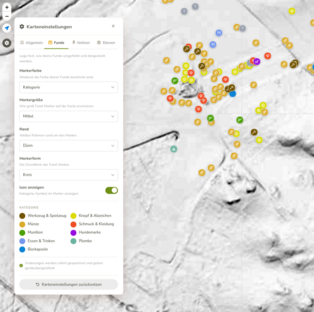](https://pinlog.app/fileadmin/user_upload/Bildschirmfoto_vom_2026-08-02_17-54-10.png)
[ Show larger version 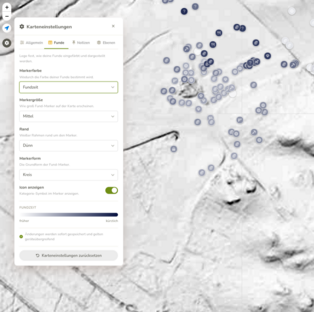](https://pinlog.app/fileadmin/user_upload/Bildschirmfoto_vom_2026-08-02_17-54-31.png)
[ Show larger version 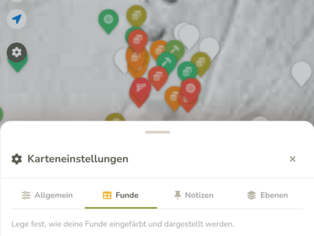](https://pinlog.app/fileadmin/_processed_/a/9/csm_pinlog.app.ddev.site_karte__14__fba8a291f8.png)
New map layer: listed monuments in Austria (Pro)
------------------------------------------------
Everyone with **Pinlog Pro** gets a new layer: “Listed monuments in Austria”. It shows you listed heritage objects directly on your map – subtly displayed in dark red and automatically grouped into clusters where they are dense, so the map stays clear.
[ Show larger version 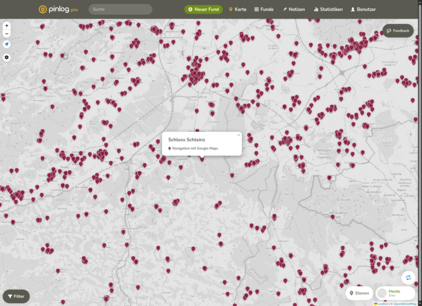](https://pinlog.app/fileadmin/_processed_/0/d/csm_pinlog.app.ddev.site_karte__13__817a8b6689.png)
### Further improvements
- **More consistent panels:** menus and settings panels on the map (layers, map settings, selection lists) now open consistently and noticeably more smoothly – on desktop and on mobile.
- **Easier to use on mobile:** the drag handle of the panels now has more space to the top edge and is easier to grab.
- **No more scrollbar in the layer menu:** long layer descriptions and source credits now wrap cleanly instead of creating a horizontal scrollbar.
- **Faster loading times:** pages load noticeably faster
[](#top "Scroll to top")